

Anatomy
Learn more about the anatomy of domain filter.
Main anatomy
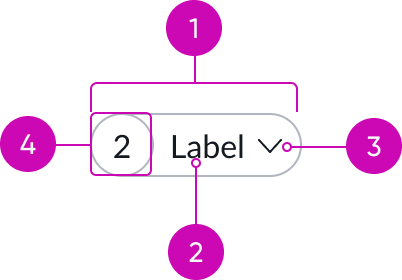
- Container: Contains all elements of the domain filter
- Label: Text that shows the name of the filter
- Caret icon: Visual representation for the action that occurs after the user interacts with the filter; the entire component is selectable, and not just the icon
- Identifier (optional): Number that shows the total number of selected items
Domain filter opened
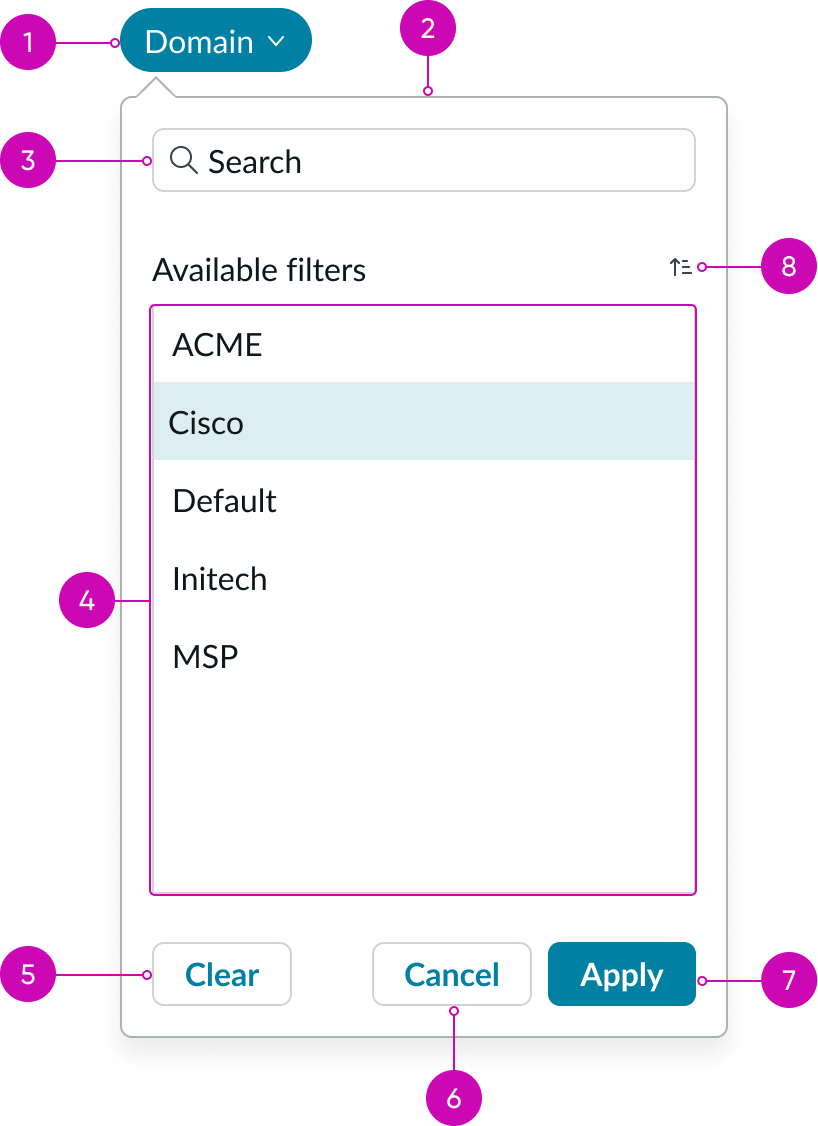
- Domain filter pill: Allows users to filter data in your dashboards or UXF pages by domains in a domain-separated instance
- Domain filter popover: Popover shows when domain filter pill is pressed
- Search: Field used for searching list of available domain filters
- Domain filter list: List of all available domain filter
- Clear button: Removes selected domain filter
- Cancel button: Closes popover without applying changes
- Apply button: Applies selected domain filter
- Sort: Alphabetically orders list of available filters A to Z and Z to A
Subcomponents
Usage
Use domain filters for special purpose, domain separated instances. Domain filters can be used similar to normal filters anywhere on dashboard.
Learn how to customize domain filter by configuring the available properties.
Domain separation is best for when you need to:
- Enforce absolute data segregation between business entities (data separation).
- Customize business process definitions and user interfaces for each domain (delegated administration).
- Maintain some global processes and global reporting in a single instance.
- Separate data between organizations.
- Have minor or moderate process differences only among organizations.
See documentation for Create a Domain filter
See documentation for Domain separation for service providers
Configurations
Domain filter lets users filter data in dashboards by domains in a domain-separated instance. The filters can apply to both tables and indicators.
Label
Configure this property to assign a label to your domain filter.
Domain source
You can configure the label for domain filter and choose between one of two sources of domains: Standard domain list and Performance analytics domains. When “Include global domain data” is enabled, values from the records in the global domain are included as well.
Design recommendations
Design recommendations for domain filter follow the same guidelines as the pill component.
Alignment and positioning
When you have multiple filters, align them in a single horizontal line above the content they are related to. Position domain filters before other filters when using them to filter analytics.
UI text guidelines
These are some recommendations for using text within filter:
- Use sentence case for all titles, labels, and column headers
- Capitalize only the first letter and any proper nouns in a string of text
- Ensure content is contextual and specific
- Create a clear and distinguishable label for any empty fields
Behavior
Learn how filter behaves when the display changes or a user interacts with the component.
States
Domain filter has the same states behaviors as the pill component.
Interactions
Learn how domain filter responds when a user interacts with it.
Applying domain filter
The user can select only one item from the filter list to appear in the domain filter pill.
Usability
Domain filter complies with all internationalization and accessibility requirements.
Internationalization
When the display translates to a right-to-left (RTL) language, the indicator appears on the right and the label appears to the left of the indicator. The caret icon appears on the left of the filter.
Accessibility
Learn how to access the actionable elements of filter through keyboard interactions and screen readers.
Keyboard interactions
You can access the actionable elements of filter with these keyboard keys:
- Tab: Moves focus to the first filter
- Arrow down or Arrow up: Moves focus to the next or previous row of filters
- Arrow right or Arrow left: Moves focus to the next or previous element within the filter
- Enter: Opens the filter popover
- Delete: Clears the filter in focus
Screen readers
Domain filter has the same screen reader considerations as the pill component.